February 1, 2012


Zuckerberg IPO Haul Could Top $28 Billion


Facebook Inc.'s impending initial public offering will likely net its 27-year-old founder Mark Zuckerberg a fortune of $28 billion.
According to IPO paperwork Facebook filed Wednesday, Mr. Zuckerberg owns 28.2% of the soon-to-be-public company, and is its single largest shareholder. If Facebook raises money at a high-end valuation of $100 billion dollars, Mr. Zuckerberg's stock would be worth $28 billion. On top of his stock, last year Mr. Zuckerberg was paid $1.49 million in salary, bonus and other compensation for his role as chief executive, according to the filing.

Facebook's Rise

See a timeline of key events in Facebook's history.

Facebook in Photos

Kimihiro Hoshino/Agence France-Presse/Getty Images

Who's Who at Facebook

Read about the company's top executives.

IPO: Go, No-Go?

Track the performance of some notable initial public offerings—the highfliers and flame-outs—of past and present.
A net worth of $28 billion would have placed Mr. Zuckerberg at number nine in Forbes magazine's rich list last year, following tech luminaries Bill Gates and Larry Ellison.
But even as Mr. Zuckerberg vaults into the pantheon of the world's richest people, the young entrepreneur has already proven he doesn't intend to act like a typical billionaire.
Mr. Zuckerberg grew up in Dobbs Ferry, N.Y., the son of a dentist and psychiatrist. He graduated from high school at the elite Phillips Exeter Academy, where he honed his talents in science and the classics.
In the nearly eight years since Mr. Zuckerberg founded Facebook in his Harvard College dorm room, the entrepreneur has grown from a college sophomore into a leading voice for a new generation of technology entrepreneurs.
In the early years after Mr. Zuckerberg moved his start-up to Palo Alto, Calif., he was known for wearing Adidas flip-flops to business meetings and placing little priority on building out an advertising business for his growing social network. He handed out business cards reading, "I'm CEO... b—."
Today, Mr. Zuckerberg has upgraded his wardrobe to Brooks running shoes and even dons a sports coat for special meetings, like with President Barack Obama and Oprah Winfrey. And his social network has become so important to many big advertisers that they run Super Bowl ads directing customers to Facebook.
Mr. Zuckerberg has also set the tone for the lifestyles behind the latest Silicon Valley boom, eschewing the giant mansions and posh cars of the late 1990s dot-com bubble. Instead, he has lived in a modest house, and is known for his penchant for taking his dog on long walks. (He runs a Facebook page for his dog Beast, a white Hungarian Puli.) In 2011, Mr. Zuckerberg became a vegetarian.
In 2010, when the movie "The Social Network" debuted and offered a sometimes unflattering Hollywood portrayal of his behavior in Facebook's early days, Mr. Zuckerberg treated his whole company to a day at the movies to watch the film together.
Mr. Zuckerberg also didn't wait to begin establishing his reputation as a philanthropist. In 2010, amidst the fall-out from the Hollywood film, he announced the formation of a charity called "Startup: Education" and pledged $100 million to support public schools in Newark.
In December 2010, he signed a pledge—along with his former roommate and Facebook co-founder Dustin Moskovitz—to give the majority of his wealth to charity.

January 31, 2012


How to prevent Google from tracking you

by  
Much has been made of Google's new privacy policy, which takes effect March 1. If you're concerned about Google misusing your personal information or sharing too much of it with advertisers and others, there are plenty of ways to thwart Web trackers.
But what exactly are you thwarting? You don't become anonymous when you block tracking cookies, Web beacons, and the other identifiers as you browse. Your ISP and the sites you visit still know a lot about you, courtesy of the identifying information served up automatically by your browser.
The Electronic Frontier Foundation offers thePanopticlick service that rates the anonymity of your browser. The test shows you the identifiable information provided by your browser and generates a numerical rating that indicates how easy it would be to identify you based solely on your browser's fingerprint.
According the the entropy theory explained by Peter Eckersley on the EFF's DeepLinks blog, 33 bits of entropy are sufficient to identify a person. According to Eckersley, knowing a person's birth date and month (not year) and ZIP code gives you 32 bits of entropy. Also knowing the person's gender (50/50, so one bit of entropy) gets you to the identifiable threshold of 33 bits.
When I ran Panopticlick's test on a Mac Mini, it reported 20.89 bits of identifiable information, which according to the entropy formula would be insufficient to identify me. But maybe I want the sites I frequent to know a little bit about me. As I explained in a post from last October, personal information is the currency of the Web.
Results of Panopticlick browser-anonyity scan
The Electronic Frontier Foundation's Panopticlick scanner generates a numerical rating of your browser's anonymity.
(Credit: Screenshot by Dennis O'Reilly)
In some ways, Google's explanation of personalized ads is more informative than the company's privacy policy. Of course it's in Google's best interest to keep you in the personalized-ads fold, but the company does its best to present personalization as a boon to users. It certainly does help pay for the "free" services we've come to rely on.
Use Google's own tools to opt out of ad networks
Prominent in the Google privacy policy are links to services that let you view and manage the information you share with Google. Some of this personal data you volunteer, and some of it is collected by Google as you search, browse, and use other services.
To view everything (almost) Google knows about you, open the Google Dashboard. Here you can access all the services associated with your Google account: Gmail, Google Docs, YouTube, Picasa, Blogger, AdSense, and every other Google property. The dashboard also lets you manage your contacts, calendar, Google Groups, Web history, Google Voice account, and other services.
Google Dashboard service listings
Get information about all the Google services associated with your account in one place via the Google Dashboard.
(Credit: Screenshot by Dennis O'Reilly)
More importantly, you can view and edit the personal information stored by each Google service, or delete the service altogether. To see which other services have access to the account's information, click "Websites authorized to access the account" at the top of the Dashboard. To block an authorized service from accessing the account, click Revoke Access next to the service name.
Sites authorized to access your Google account
View the services that access information in your Google account via a link on the Google Dashboard.
(Credit: Screenshot by Dennis O'Reilly)
The Google Ads Preferences Manager lets you block specific advertisers or opt out of all targeted advertising. Click the "Ads on the Web" link in the left column and then choose "Add or edit" under "Your categories and demographics" to select the categories of ads you want to be served or to opt out of personalized ads.
Google Ad Preferences Manager categories and opt-out options
Google's Ad Preferences Manager lets you choose the categories of ads you see or opt out of personalized ads entirely.
(Credit: Screenshot by Dennis O'Reilly)
Another option is to use Google's Keep My Opt-Outs extension for Chrome. Google also participates in the Network Advertising Initiative's opt-out program. Select some or all of the dozens of online advertisers from the NAI program and then click Submit to place a cookie in your browser instructing the ad networks not to serve personalized ads.
Free add-on for Firefox and Google Chrome targets tracking cookies
Several free browser extensions help you identify and block the companies that are tracking you on the Web. For example, Ghostery (available in versions for Firefox and Chrome) adds an icon to your browser toolbar showing the number of trackers on the current page. Click the icon to see a list of the trackers and view options for blocking or white-listing specific ones.
The free Disconnect extension (also available for Facebook and Chrome) takes a more direct approach to wiping your Web tracks. Disconnect blocks tracking by Google, Facebook, Twitter, Yahoo, and Digg. It also has an option for depersonalizing searches.
Disconnect tracker-blocking pop-up window in Google Chrome
The free Disconnect extension for Google Chrome and Firefox blocks tracking by Google and other popular Web services.
(Credit: screenshot by Dennis O'Reilly)
As with Ghostery, Disconnect places an icon in the browser toolbar that shows the number of elements it has blocked on the current page. Click the icon to open a window showing the number of trackers blocked for each service. To unblock tracking for one of the services, click its entry. (Note that I tested Disconnect only with Google; also, blocking of international Google domains is not yet available, according to Disconnect's developers.)
When I tested Disconnect, I had to sign in to Gmail, Google Docs, and other Google services every time I returned to or refreshed one of those pages, which is understandable considering that blocking the cookie prevents Google from keeping you signed in. Otherwise I was able to use Google services without a problem, including search, viewing and sending Gmail, and accessing, creating, uploading, and downloading Google Docs files.
While people are rightly concerned about who is watching and recording their Web activities, at least Google makes it possible to use the company's services without being too forthcoming with your personal information. ISPs and other Web services do as much tracking as Google--or more--but garner far fewer headlines. For a detailed look at the state of privacy in the digital world, read about the Electronic Frontier Foundation's Surveillance Self-Defense project.
After all, the true threat to privacy is from the trackers we don't know about, and who aren't household names.

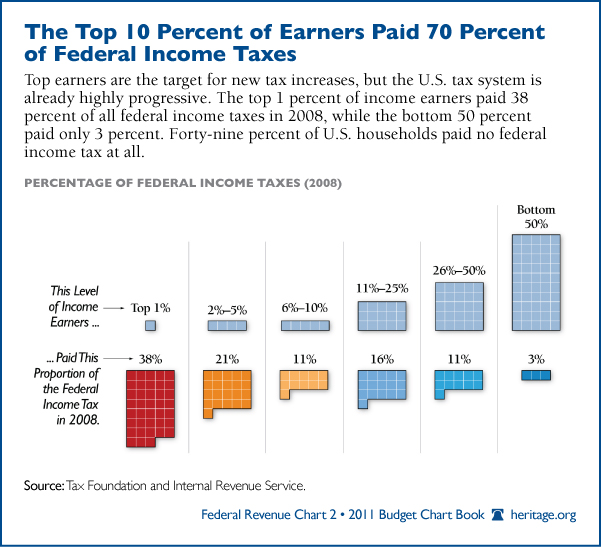
Chart of the Week: Top 1 Percent Paid 38 Percent of Federal Income Taxes

President Obama used his State of the Union address Tuesday to outline his idea of fairness. To put it simply, that means redistributing wealth by raising taxes on the most successful Americans.
“If you make more than $1 million a year, you should not pay less than 30 percent in taxes,” Obama declared. He added: “Now, you can call this class warfare all you want. But asking a billionaire to pay at least as much as his secretary in taxes? Most Americans would call that common sense.”
Heritage’s Curtis Dubay challenged Obama’s characterization of the so-called “Buffett Rule.” Dubay said it was a fallacy.
“The President can claim success on this one even before he ends his speech tonight because the Buffett Rule is already soundly in place,” Dubay wrote in response to Obama’s speech. “According to the CBO, the top 1% of income earners pay 30 percent of their income in all federal taxes.”
This week’s chart reveals the top 10 percent of income earners paid 70 percent of all federal income taxes in 2008, while the bottom 50 percent paid only 3 percent. Remarkably, 49 percent of U.S. households paid no federal income tax at all.